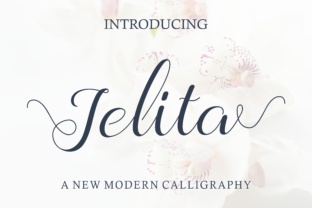
Jelita: A Script Font That Breathes Elegance Into Every Project
Designing with Jelita: Tips for Success
- Test it in different sizes: Jelita looks best at larger sizes, especially when used on labels, stickers, or printed cards. When scaled down, some of its delicate features may become less legible.
- Pair it wisely: Jelita pairs well with clean sans serif fonts for a modern look, or with simple serif fonts for a more classic feel. It also works beautifully with other script fonts for a cohesive, elegant design.
- Check your file formats: Make sure you have access to all the styles, weights, and alternates included in the font. This will give you more flexibility when designing for different applications.
- Consider multilingual support: If you plan to use Jelita in international markets, verify that it supports the languages you need.
- Use it for branding: Jelita can be a powerful tool for building brand identity. Its consistent style helps create a strong visual presence across all your products and marketing materials.
Real-World Applications of Jelita
Candle Labels: Jelita adds a personal touch to my candle labels, making each one feel like a handwritten note from the creator. It’s especially effective when paired with minimalist design elements like watercolor backgrounds or subtle textures.
Wedding Invitations: For a couple who wanted a romantic yet modern feel, I used Jelita on their wedding welcome board and place cards. The script’s elegance matched their vision perfectly.
Boutique Packaging: I’ve used Jelita on packaging for a small line of artisanal soaps and bath bombs. It gives the packaging a polished, handmade look that appeals to customers looking for quality and charm.
Digital Printables: Jelita is also a great choice for digital templates. Whether it’s printable wall art, planner pages, or social media graphics, its clean and friendly style ensures readability while maintaining a stylish edge.